Why HSA Receipt Tracking Matters
If you are looking for an HSA receipt tracker app, you have more options than you think. The right one saves you hours of manual work. It also saves you thousands in tax-free reimbursements over time.
A typical non-elderly family pays about $1,400 a year in out-of-pocket medical costs. That number comes from the Peterson-KFF Health System Tracker. Copays, deductibles, prescriptions. If you have an HSA, every one of those receipts is worth real money. Not someday. Right now. A $200 doctor visit receipt is $200 you can pull out of your HSA tax-free whenever you want.
But most people either swipe their HSA debit card immediately (killing the growth potential) or lose the receipts entirely. Both mistakes cost thousands over time.
The fix is a receipt tracker built for HSA holders. Something that stores your receipts, tracks what you have spent, and tells you how much you can reimburse. I looked at seven options and compared them honestly. Here is what I found.
HSA Receipt Tracker Comparison Table
| App | Price | AI Receipt Parsing | Reimbursement Tracking | Growth Projections | Backup | Export | Phone Upload |
|---|---|---|---|---|---|---|---|
| Tripl | Free | Claude AI | lump sum + per-expense | 5/10/20yr | Drive + Dropbox | CSV + tax-year PDF | iOS app + QR |
| TrackHSA | $2/mo | No | per-expense, manual | No | No | receipts + reports | web only |
| Shoebox | $60-120/yr | Yes | partial | retirement metrics | No | full library | web + email |
| Reimbursable | $19/yr | Plaid, not OCR | per-expense + Form 8889 | No | No | data + Form 8889 | mobile, unverified |
| Lively | Free (with HSA) | manual upload | debit-linked | No | No | per-receipt | iOS + Android |
| HealthEquity | Free (with HSA) | manual upload | debit-linked claim | No | No | tax forms | iOS + Android |
| Spreadsheet | Free | No | Manual | Manual | No | you own it | No |
Tripl
- Price
- Free
- AI Receipt Parsing
- Claude AI
- Reimbursement Tracking
- lump sum + per-expense
- Growth Projections
- 5/10/20yr
- Backup
- Drive + Dropbox
- Export
- CSV + tax-year PDF
- Phone Upload
- iOS app + QR
TrackHSA
- Price
- $2/mo
- AI Receipt Parsing
- No
- Reimbursement Tracking
- per-expense, manual
- Growth Projections
- No
- Backup
- No
- Export
- receipts + reports
- Phone Upload
- web only
Shoebox
- Price
- $60-120/yr
- AI Receipt Parsing
- Yes
- Reimbursement Tracking
- partial
- Growth Projections
- retirement metrics
- Backup
- No
- Export
- full library
- Phone Upload
- web + email
Reimbursable
- Price
- $19/yr
- AI Receipt Parsing
- Plaid, not OCR
- Reimbursement Tracking
- per-expense + Form 8889
- Growth Projections
- No
- Backup
- No
- Export
- data + Form 8889
- Phone Upload
- mobile, unverified
Lively
- Price
- Free (with HSA)
- AI Receipt Parsing
- manual upload
- Reimbursement Tracking
- debit-linked
- Growth Projections
- No
- Backup
- No
- Export
- per-receipt
- Phone Upload
- iOS + Android
HealthEquity
- Price
- Free (with HSA)
- AI Receipt Parsing
- manual upload
- Reimbursement Tracking
- debit-linked claim
- Growth Projections
- No
- Backup
- No
- Export
- tax forms
- Phone Upload
- iOS + Android
Spreadsheet
- Price
- Free
- AI Receipt Parsing
- No
- Reimbursement Tracking
- Manual
- Growth Projections
- Manual
- Backup
- No
- Export
- you own it
- Phone Upload
- No
1. Tripl (triplapp.com)
Full disclosure. We built Tripl. I will try to be fair about what it does well and where it falls short.
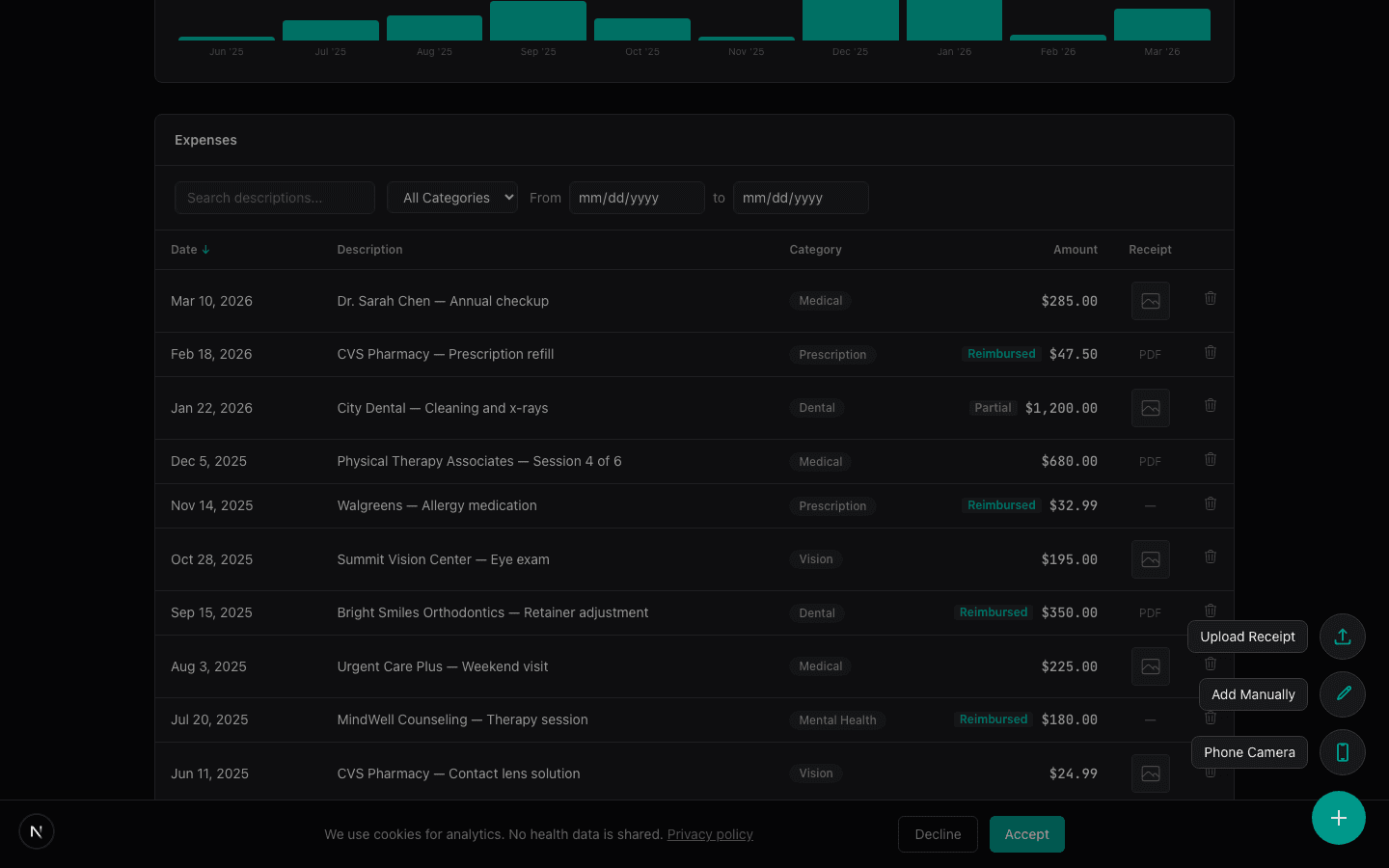
What it does: Tripl is an HSA expense tracker with AI-powered receipt parsing. You upload a receipt (photo, PDF, or HEIC file). It pulls out the provider, amount, date, and category automatically. It tracks reimbursements two ways. You can reimburse individual expenses or enter a lump sum. The lump sum applies to your oldest receipts first, so newer expenses keep growing tax-free.
It also shows growth projections. For every unreimbursed expense, you can see projected growth over 5, 10, or 20 years. That is what the money could be worth if you leave it invested.
Pricing: $50/year, or $30/year for the first 100 sign-ups. First 5 receipts free.
Strengths:
- ●AI receipt parsing saves a lot of manual data entry
- ●Smart lump-sum reimbursement applies to your oldest receipts first, useful when you reimburse in bulk
- ●Growth projections help you decide when to reimburse
- ●Native iOS app on the App Store. Snap a receipt at the doctor or pharmacy before you walk out.
- ●QR code for phone camera uploads (scan from desktop, snap from phone)
- ●Email forwarding. Send receipts to receipts@triplapp.com
- ●Linked email forwarding. Authorize a spouse's email to forward in. Their receipts land on your dashboard flagged for review.
- ●Google Drive and Dropbox two-way sync. Drop a receipt in a folder, it imports to Tripl. Auto-backup of everything you upload.
- ●Clean, modern interface
Weaknesses:
- ●Newer product. Smaller user base than established providers.
- ●No Android app yet. Android users get the web app, which works well on mobile browsers.
- ●Does not connect to your HSA provider. You track expenses separately.
- ●Newer business. A $50/year subscription is cheap, but you are betting on a small company.
Best for: People who want AI receipt parsing and care about the reimbursement strategy. If you pay out of pocket and save receipts for later, Tripl is built for that workflow.
2. TrackHSA (trackhsa.com)
TrackHSA has been around since 2016. It is the oldest dedicated HSA tracker I found.
What it does: It is a straightforward receipt and expense tracker. You manually enter each purchase, upload receipts, and track reimbursements. Everything is organized by year. You can see your total spending, what has been reimbursed, and what is still outstanding.
Pricing: $2/month after a 30-day free trial. Paid annually.
Strengths:
- ●Simple and focused. Does one thing and does it clearly.
- ●$2/month is affordable for what you get
- ●Cloud-based receipt storage with secure backup
- ●Has been running for 10 years. Proven stability.
Weaknesses:
- ●No AI parsing. Every expense is manual entry.
- ●The interface looks dated. Functional, but not modern.
- ●No growth projections or investment insights
- ●No mobile app or phone camera workflow
- ●$2/month adds up. That is $24/year for basic bookkeeping.
Best for: People who want a simple, no-frills receipt tracker and do not mind manual data entry. If you prefer straightforward tools over flashy features, TrackHSA gets the job done.
3. Shoebox (shoebox.io)
Shoebox is a newer entrant focused specifically on the HSA "shoebox strategy." The name is literal. It replaces the shoebox of receipts under your bed.
What it does: AI-powered receipt capture. You can snap photos or forward email receipts. It stores everything, tracks your unreimbursed total, and projects what your HSA could be worth if you delay reimbursement. It positions itself heavily around retirement planning.
Pricing: $120/year at full price. $60/year with their early adopter code (50% off). They offer a 30-day free trial.
Strengths:
- ●AI receipt capture reduces manual work
- ●Strong focus on the delayed reimbursement strategy
- ●Retirement growth projections built in
- ●Email forwarding for receipts
- ●Receipt organization and reimbursement tracking
Weaknesses:
- ●$60-120/year is the most expensive option on this list
- ●Pricing has not always been transparent. It has changed.
- ●Relatively new. Less track record than some alternatives.
- ●No lump-sum reimbursement logic that I could find
- ●The retirement positioning might be more than some people need
Best for: People who are all-in on the HSA-as-retirement-account strategy and want a dedicated tool for it. If you are willing to pay for a polished experience, Shoebox delivers.
4. Reimbursable (reimbursable.com)
Reimbursable is a dedicated HSA receipt tracker focused on expense detection and tax reporting.
What it does: Reimbursable automatically detects HSA-eligible expenses and stores your receipts. It generates tax forms and keeps your records audit-ready. The app is built specifically for HSA holders who want organized documentation at tax time.
Pricing: Starts at $19/year. Multiple tiers available.
Strengths:
- ●Automatic expense detection for HSA-eligible purchases
- ●Tax form generation and audit-ready record keeping
- ●Affordable at $19/year compared to other paid options
- ●Built specifically for HSA receipt tracking
Weaknesses:
- ●Smaller user base than established providers
- ●No growth projections or delayed reimbursement tools
- ●Less information publicly available about advanced features
- ●No lump-sum reimbursement logic
Best for: People who want affordable, tax-focused receipt tracking without the cost of Shoebox. Good fit if audit readiness is your main concern.
5. Lively (livelyme.com)
Lively is not a standalone tracker. It is an HSA provider that happens to have decent tracking features in its app.
What it does: Lively offers a full HSA account with investing through Schwab. The app includes an "Expense Scout" feature that scans linked external accounts for potential HSA-eligible purchases. You can upload receipts and track reimbursements. A deductible tracker shows your progress against your plan's deductible.
Pricing: Free for individuals. No monthly maintenance fees. Investment fees are $24/year for a Schwab brokerage account, or 0.50%/year for their guided portfolio option.
Strengths:
- ●Free HSA account with no maintenance fees
- ●Expense Scout is a clever feature. It flags eligible expenses from your bank transactions.
- ●Invest through Schwab with a full brokerage account
- ●Good mobile app
- ●All-in-one. Your HSA and your tracking in the same place.
Weaknesses:
- ●You have to use Lively as your HSA provider. Not a standalone tracker.
- ●Receipt and expense tracking is secondary to the account itself
- ●No AI receipt parsing. Manual uploads.
- ●No growth projections on individual expenses
- ●If your employer uses a different HSA provider, you would need to transfer funds periodically
Best for: People who want a good HSA provider with built-in tracking. If you are shopping for an HSA account (not just a tracker), Lively is one of the better options.
6. HealthEquity App
HealthEquity is the largest HSA administrator in the US. If your employer offers an HSA, there is a decent chance it is through HealthEquity.
What it does: The HealthEquity app lets you check balances, submit claims, upload receipts, and pay providers directly. Their "EZ Receipts" feature can pull expense info from pharmacy receipts automatically.
Pricing: Free if your employer covers the admin fee. Otherwise, up to $3.95/month depending on your balance and plan. $1/month for paper statements (switch to electronic to avoid it).
Strengths:
- ●Integrated with your actual HSA account
- ●EZ Receipts for pharmacy and drugstore claims
- ●Direct provider payments from the app
- ●Debit card management
- ●Huge user base. Well-established.
Weaknesses:
- ●Only works if HealthEquity is your HSA provider
- ●Tracking features are basic. Built for claims, not long-term receipt management.
- ●No growth projections or reimbursement strategy tools
- ●The app gets mixed reviews for usability
- ●Monthly fees can apply depending on your employer's arrangement
- ●Investment options are more limited than Fidelity or Schwab
Best for: People whose employer already uses HealthEquity. The app is fine for basic tracking. But it is not designed for the delayed reimbursement strategy.
7. Spreadsheets (Google Sheets, Excel)
The DIY approach. Plenty of people track their HSA expenses in a spreadsheet, and honestly, it works.
What it does: Whatever you build it to do. Most people create columns for date, provider, amount, category, receipt file name, and reimbursement status. Some add growth projection formulas.
Pricing: Free (Google Sheets) or included with Office 365.
Strengths:
- ●Completely free
- ●Total control over your data
- ●You can build exactly the tracking system you want
- ●No account to create. No app to learn.
- ●Works offline (Excel)
Weaknesses:
- ●No receipt storage built in. You need a separate folder for photos and PDFs.
- ●Manual everything. Every entry, every calculation.
- ●No AI. No automation.
- ●Easy to fall behind and stop updating
- ●Receipts can get separated from the spreadsheet over time
- ●No mobile-friendly way to capture receipts on the go
Best for: People who like building their own systems and will actually maintain them. Be honest with yourself here. If you have ever started a spreadsheet and abandoned it after three months, a dedicated app might serve you better.
What Makes a Good HSA Receipt Tracker?
A good HSA receipt tracker does three things. It stores your receipts securely. It tracks which expenses you have reimbursed and which are still outstanding. And it makes the habit easy enough that you actually stick with it.
Bonus features like AI parsing, growth projections, and tax reports are nice. But the core job is simple: keep your receipts organized so you can reimburse yourself later.
So Which HSA Receipt Tracker Should You Use?
It depends on what you care about most.
If you want the least manual work: Tripl or Shoebox. Both use AI to parse receipts. Tripl is $30/year for the first 100 sign-ups, then $50. Shoebox costs $60-120/year but has a retirement planning angle.
If you want affordable and tax-focused: Reimbursable at $19/year. Good expense detection and audit-ready reports.
If you want simple and cheap: TrackHSA at $2/month. No frills, but it works.
If you want everything in one place: Lively gives you an HSA account plus tracking. HealthEquity does the same if your employer already uses them.
If you want total control: A spreadsheet. Just be realistic about whether you will keep it up.
I think the most important thing is to pick something and actually use it. A $2/month tracker that you update consistently beats a free AI-powered app that you forget about. The receipts only matter if you save them.
If you are not tracking your HSA receipts at all right now, any of these options is a massive upgrade over nothing.
Frequently Asked Questions
Do I really need an HSA receipt tracker app?
Technically, no. The IRS does not require you to use any specific tool. But you do need to keep receipts for qualified medical expenses. This matters most if you are using the delayed reimbursement strategy. Without organized records, you cannot prove your expenses in an audit. And you cannot reimburse yourself for receipts you have lost. A receipt tracker makes the habit stick.
Can I use an HSA tracker with any HSA provider?
Standalone trackers like Tripl, TrackHSA, and Shoebox work with any HSA provider. They do not connect to your HSA account directly. You track expenses separately and reimburse yourself when you are ready. Provider apps like Lively and HealthEquity only work with their own accounts.
What is the best free HSA receipt tracker app?
Tripl and spreadsheets are both free. Tripl adds AI receipt parsing, reimbursement tracking, and growth projections. A spreadsheet gives you complete control but requires manual work. Lively and HealthEquity apps are also free but only if you hold an account with them.
How long should I keep HSA receipts?
There is no time limit on HSA reimbursements. You can reimburse yourself for a medical expense from 2015 in 2026. The only requirement is that your HSA was open when the expense occurred. The IRS recommends keeping tax records for at least three years, but for HSA receipts, indefinitely is the right answer. Digital storage makes this easy. A photo of a receipt stored in the cloud lasts forever.
*This is educational content, not financial or tax advice. Consult a qualified professional before making decisions about your HSA.*